

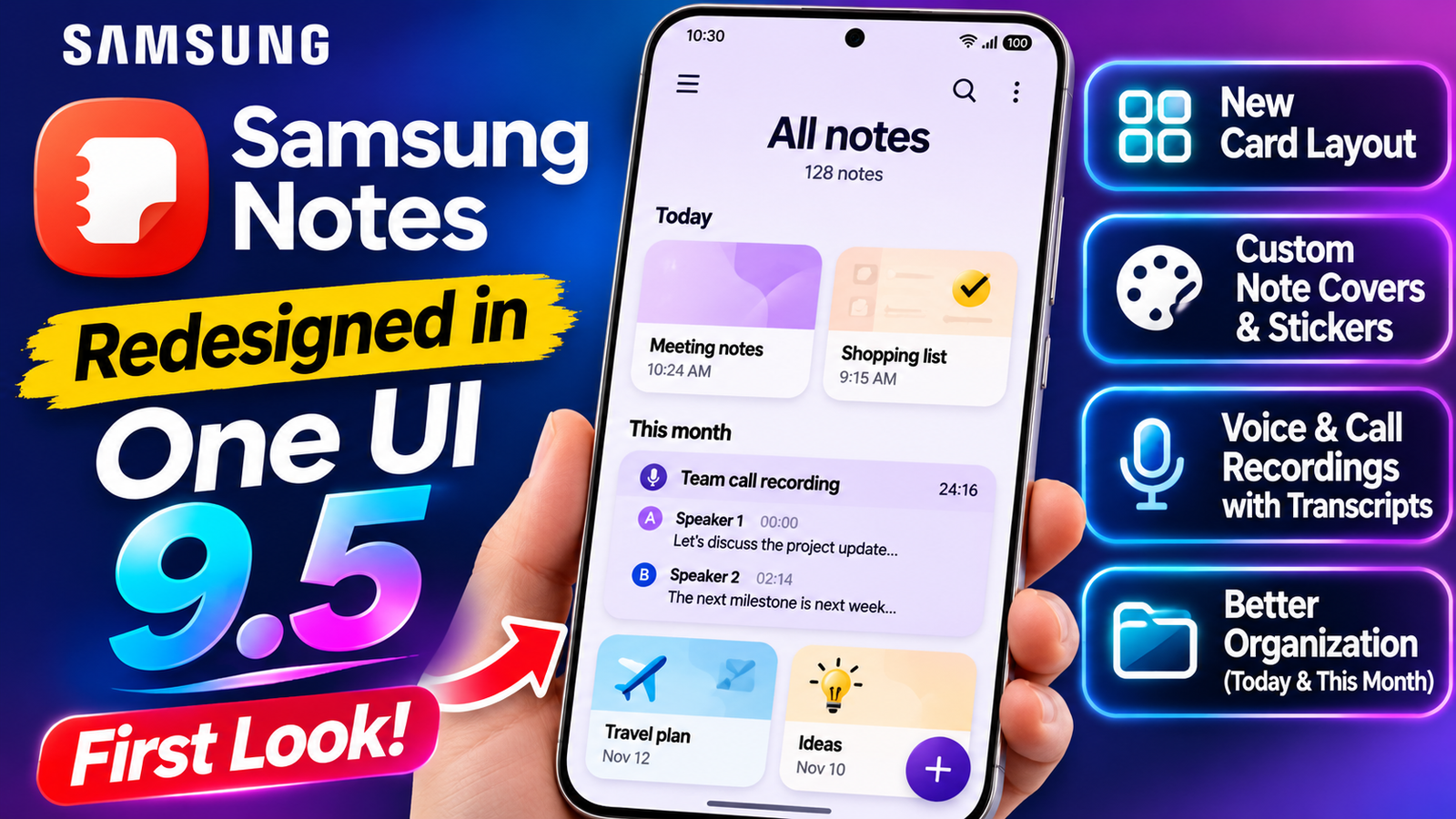
Samsung Notes One UI 9.5 Redesign: New Features and First Look: Samsung is preparing several software improvements for its Galaxy smartphones, and One UI 9.5 could introduce some interesting changes to the company’s built-in applications. One of the apps reportedly receiving a noticeable redesign is Samsung Notes, which millions of Galaxy users rely on for writing notes, saving important information, organizing documents, and recording conversations.
Early screenshots of the redesigned Samsung Notes app suggest that Samsung is working on a cleaner interface, a new card-based layout, customizable note covers, and improved ways to access voice and call recordings. The update could also make it easier to identify recorded conversations by displaying transcript previews and speaker information directly in the notes list.
Although Samsung has not officially announced these changes, the leaked screenshots provide an early look at what users might expect from the upcoming software update.
The redesigned application is expected to be part of One UI 9.5, which could arrive alongside the next generation of Samsung Galaxy smartphones.
Here is everything currently known about the upcoming Samsung Notes redesign, including its new interface, recording features, customization options, and expected availability.
1. Samsung Notes Gets a Cleaner and More Modern Interface
One of the biggest changes in the upcoming Samsung Notes update is its redesigned main screen.
The current application provides several ways to organize notes, but finding a particular document can become difficult when users accumulate hundreds of saved entries.
Samsung appears to be addressing this problem with a more visual interface.
According to the leaked screenshots, the redesigned application features a large, centered heading labelled “All notes.” A note count is displayed underneath, giving users a quick overview of how many entries they have saved.
Instead of displaying notes in a traditional list, the updated interface reportedly uses a two-column card grid.
This approach gives individual notes more visual space and makes the overall screen look more organized.
The notes are also grouped into sections such as “Today” and “This month.” This allows users to identify recently created or updated notes without manually searching through the entire collection.
For people who regularly use Samsung Notes for personal reminders, work-related information, shopping lists, and study materials, this could make everyday navigation more convenient.
The updated design also gives the application a more modern appearance that fits the visual direction of Samsung’s newer One UI interface.
2. New Card-Based Layout Makes Finding Notes Easier
The card-based design is another important part of the Samsung Notes redesign.
Each saved note appears as an individual card, allowing users to identify important information more easily.
Rather than relying entirely on note titles, the visual previews can help distinguish between different types of content.
For example, users might have separate notes for meeting information, personal reminders, travel plans, and shopping lists.
A card-based interface makes it easier to scan these entries quickly.
The updated layout also uses time-based sections to organize content.
The “Today” section can help users locate recently created notes, while “This month” provides access to older entries from the current month.
This approach could be particularly useful for people who use Samsung Notes as their primary digital notebook.
However, the final organization options and sorting controls have not yet been fully confirmed.
Samsung may introduce additional customization options before the application becomes publicly available.
3. Voice Recordings and Call Recordings Get Better Previews
One of the most interesting improvements in the leaked Samsung Notes redesign involves voice recordings.
Many Galaxy users rely on voice recordings to save important conversations, lectures, interviews, and meetings.
Previously, finding a specific recording could require opening individual files and checking their contents.
The redesigned Samsung Notes app appears to make this process easier.
According to the leaked screenshots, voice recordings and call recordings will appear as individual cards in the main notes interface.
These cards reportedly include:
- A coloured or tinted background
- A microphone icon
- The total recording duration
- A preview of the recorded conversation
- Transcript information
- Speaker identification
- Timestamps for individual sections
This is a meaningful improvement because users can understand what a recording contains before opening it.
For example, someone who records several business meetings could quickly identify the conversation they need by looking at its transcript preview.
Students could also benefit from this feature when managing recorded lectures and study discussions.
Instead of opening every recording separately, users may be able to find relevant information directly from the main Samsung Notes screen.
4. Speaker Identification Makes Transcripts More Useful
Another interesting detail is the way Samsung Notes reportedly displays speaker information.
The leaked screenshots suggest that transcripts are separated by speaker, with timestamps appearing alongside individual sections.
This is particularly useful when a recording contains multiple participants.
Imagine recording a business meeting involving three people. A traditional transcript may display all spoken words in one continuous block.
However, a speaker-separated transcript makes it easier to understand who said what.
Users could potentially review discussions, identify important statements, and return to specific parts of the recording more efficiently.
This functionality could be especially valuable for professionals, journalists, students, and people who frequently attend meetings.
Samsung’s Galaxy AI ecosystem already includes transcription-related capabilities on supported devices and applications.
The redesigned Samsung Notes interface appears to make the resulting information easier to browse and organize.
However, the availability of transcription and speaker-identification features may depend on the Galaxy device, language support, region, and compatible software.
5. Custom Note Covers Add More Personalization Options
Samsung is also reportedly introducing customizable covers for individual notes.
The new “Edit cover” menu could allow users to select a visual design for their saved notes.
Instead of every note appearing with a similar preview, users may be able to create different covers depending on the information stored inside each document.
The leaked interface suggests several customization options, including:
- Different background colours
- Decorative patterns
- Illustrations
- Text-based cover designs
- Stickers and small visual elements
Users could also select stickers representing different activities or categories.
Examples shown in the early information include a shopping cart, a briefcase, and a checklist.
These options could help users create a visual organization system without depending entirely on folders.
For example, a shopping-related note could have a shopping cart sticker, while an important work document could use a briefcase illustration.
Similarly, a personal checklist could feature a dedicated checklist design.
Although these additions may appear relatively small, they could make the application more enjoyable and practical for people who maintain a large collection of notes.
6. Simplified Note Editor Improves Everyday Usability
The redesigned Samsung Notes experience is not limited to the main screen.
The individual note editor is also expected to receive some interface improvements.
Based on the early screenshots, the updated editor features a larger title field positioned near the top of the screen.
This gives the note title more visibility and makes it easier to identify the document being edited.
Users can also access options for marking a note as a favourite and moving it into a specific folder.
These controls are particularly helpful when working with important information that needs to remain easy to access.
For example, users could favourite frequently used notes such as work schedules, personal checklists, important instructions, or project information.
The simplified layout appears to focus on reducing unnecessary visual elements while keeping commonly used actions accessible.
The final version could include additional editing options that have not yet appeared in the leaked screenshots.
7. Folder View Also Receives a Visual Upgrade
Folders are important for users who maintain a large collection of notes.
The upcoming redesign reportedly applies a similar card-based layout to the Folders view.
Folders appear as cards near the top of the screen, while the notes stored inside them are displayed underneath.
This creates a consistent experience between the main notes page and the folder section.
For example, users could organize their notes into categories such as Work, Personal, Education, Travel, and Shopping.
The card-based presentation should make it easier to recognize different folders and access saved information.
It also reduces the need to navigate through several separate menus just to find a particular document.
8. Better Organization Could Make Samsung Notes More Useful for Galaxy AI
Samsung Notes has gradually become more than a basic application for writing and saving text.
With Galaxy AI features available on supported devices, users can work with recorded audio, generate summaries, organize information, and process written content.
The redesigned interface could make these capabilities easier to access.
For example, someone who records a meeting could use supported transcription tools to convert speech into text and then save the resulting information in Samsung Notes.
The new recording cards could make it easier to identify those saved conversations.
However, it is important to distinguish between the interface redesign and existing Galaxy AI capabilities. The leaked screenshots do not confirm that Samsung is introducing an entirely new transcription engine with One UI 9.5.
Instead, the visible improvements primarily focus on how recorded content and transcripts are presented inside Samsung Notes.
9. When Will the Redesigned Samsung Notes App Arrive?
Samsung has not officially announced the redesigned Samsung Notes application or confirmed its final release date.
Based on current reports, One UI 9.5 beta testing could begin after mid-November 2026.
The Galaxy S27 series is expected to be among the first devices to launch with the stable version of the new software in 2027.
However, these timelines remain expectations rather than confirmed Samsung announcements.
The redesigned Notes application could also become available to eligible existing Galaxy devices through a separate app update or a future One UI release.
Compatibility may depend on the smartphone model, software version, and regional availability.
Samsung could also make changes to the design and features before the final public release.
Users should therefore wait for official announcements before expecting these features on their current Galaxy devices.
10. What This Redesign Means for Samsung Galaxy Users
The Samsung Notes redesign may not look like a major software upgrade at first glance, but its changes could make a noticeable difference in everyday use.
The new card-based layout improves the visual organization of saved information, while custom covers offer another way to identify important notes.
The updated voice and call recording previews could be particularly useful for people who regularly record conversations.
Speaker-separated transcript previews would also make it easier to locate important information without opening every recording individually.
For students, professionals, and everyday Galaxy users, these improvements could make Samsung Notes a more convenient place to manage different types of information.
The most important point is that Samsung appears to be focusing on usability rather than simply adding more visual effects.
If the reported changes make it into the final release, Samsung Notes could become a more organized and user-friendly application within the One UI ecosystem.
Final Verdict: Is the Samsung Notes Redesign Worth Waiting For?
The upcoming Samsung Notes redesign looks like a useful improvement for Galaxy smartphone users.
Its redesigned card grid, Today and This month sections, custom note covers, and improved recording previews could make organizing information much easier.
The ability to preview transcripts and speaker information directly from recording cards is particularly promising for people who regularly record meetings, lectures, and conversations.
However, Samsung has not officially confirmed these features, and the leaked interface may change before the public release of One UI 9.5.
Overall, the redesign looks like a positive step towards making Samsung Notes more organized, personalized, and practical.
Read More: Meta VR Glasses Review: 5K Display, 100g Design, Features and Price
1 thought on “Samsung Notes One UI 9.5 Redesign: New Features and First Look”
Comments are closed.